

New features and changes
Highlights of this update:
- Compliance calendar: all your deadlines in one calendar, also in Outlook or Google Calendar
- Requirements not yet in force are marked and kept apart from your compliance figures
- Evidence of Compliance checklists for requirements
- Assign and tag requirements in bulk
- New indicators for findings and tasks on dashboards and reports
- Document Register with document numbers, versions, update intervals and responsible persons
- Temporary access rights with an end date, a reason and an access change log
- Redesigned e-mails, a daily action digest, a new finding type Opportunity, and many usability improvements
Attention! Can’t see a specific update feature in your account? Some features require a separate subscription.
Contact us and we’ll be happy to tell you more and help you choose the extension that best suits your needs.
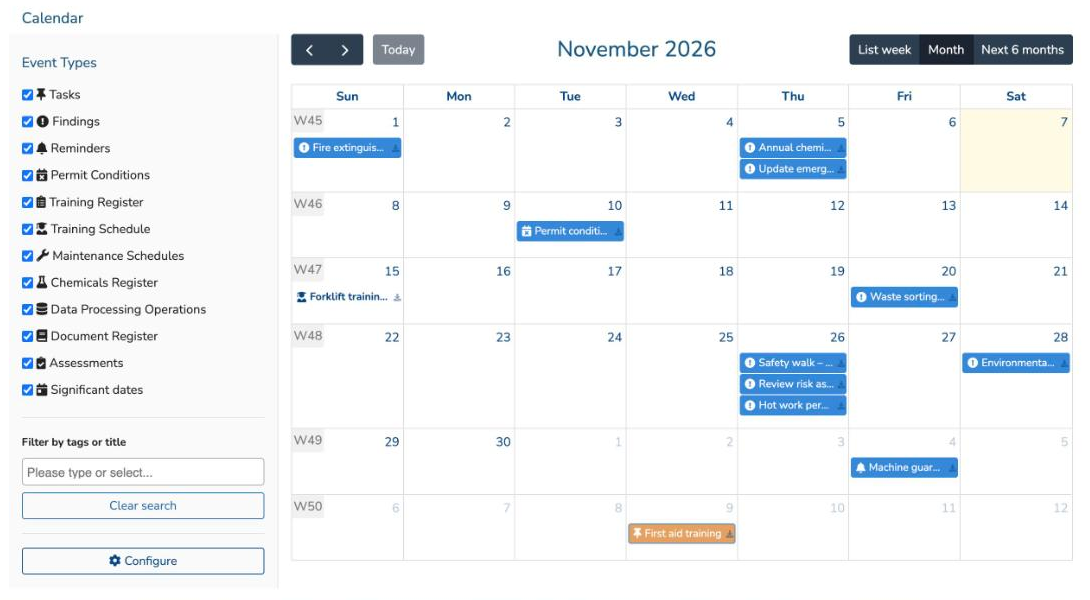
Compliance calendar
The new Calendar shows all your upcoming EHS deadlines in one place: task and finding due dates, requirement reminders and deadlines, permit condition reminders, permit and training validity, maintenance schedules, assessments and other significant dates. Filter the view by event type or tag, and switch between month, week list and a six-month list.
- Subscribe in Outlook or Google Calendar with your personal calendar link (Configure). Events are labelled with their account.
- My calendar shows one personal view across all the accounts you work in, and you can limit it to items where you are responsible or a listener.
The calendar is available with the Compliance Calendar subscription.
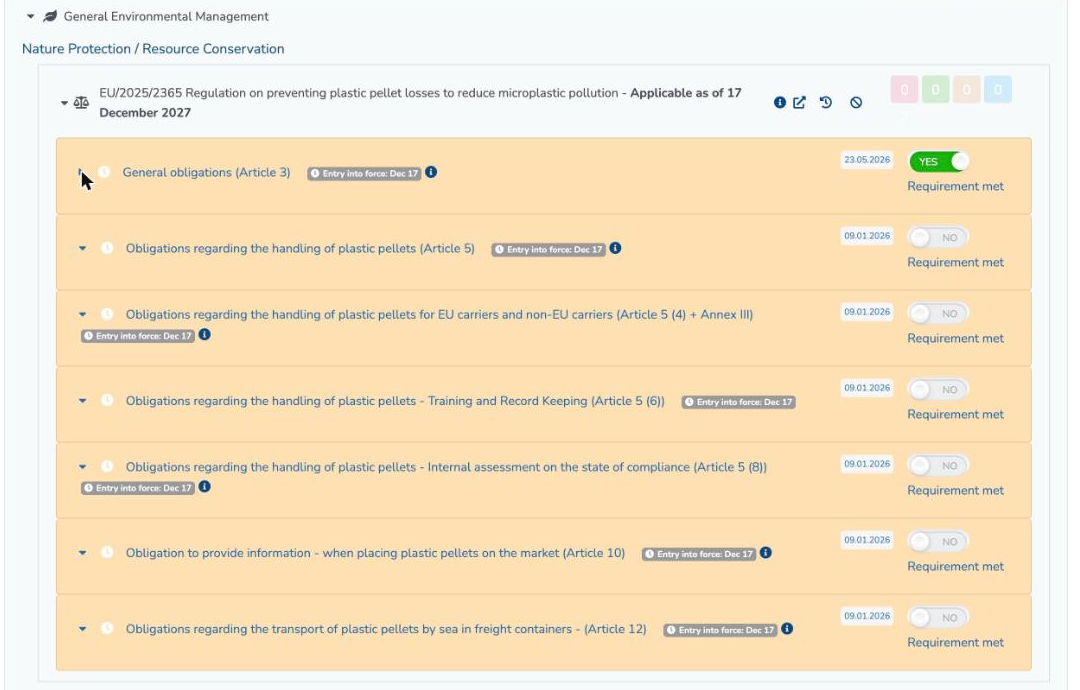
Requirements not yet in force
A requirement whose entry into force is still ahead is now marked with a clock badge showing the date it takes effect, and the row is highlighted in light orange. Until then it does not count against your compliance figures.
The compliance follow-up report in Management Reports has a new option, Show separately requirements not yet in force, so you can prepare for upcoming obligations without mixing them with the current ones.
Evidence of Compliance: a requirement can now carry a checklist of evidence items. Mandatory items must be ticked before the requirement can be marked as met, and tasks can be linked to the items. The checklists are shown where Ramboll has defined them in the content.
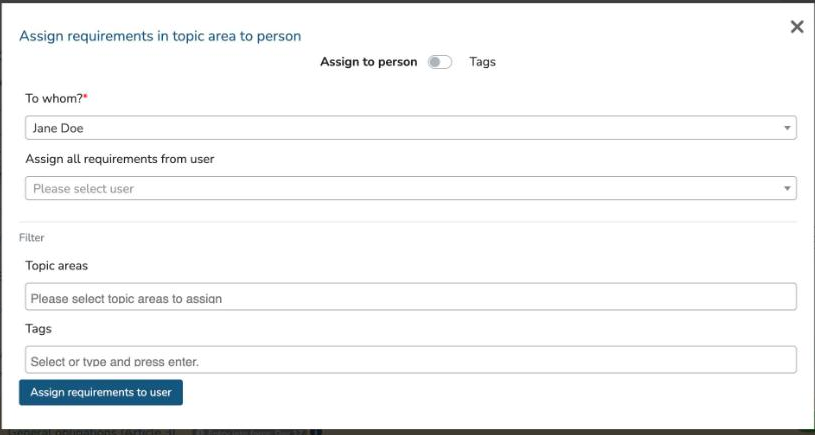
Assign and tag requirements in bulk
The Assign to users window (person icon at the top of the Requirements Register) now has two modes:
- Assign to person: assign whole topic areas to a responsible person, or move all requirements from one person to another, for example when responsibilities change.
- Tags: add or remove tags on many requirements at once.
The Responsible person filter can also show requirements that have no responsible person yet.
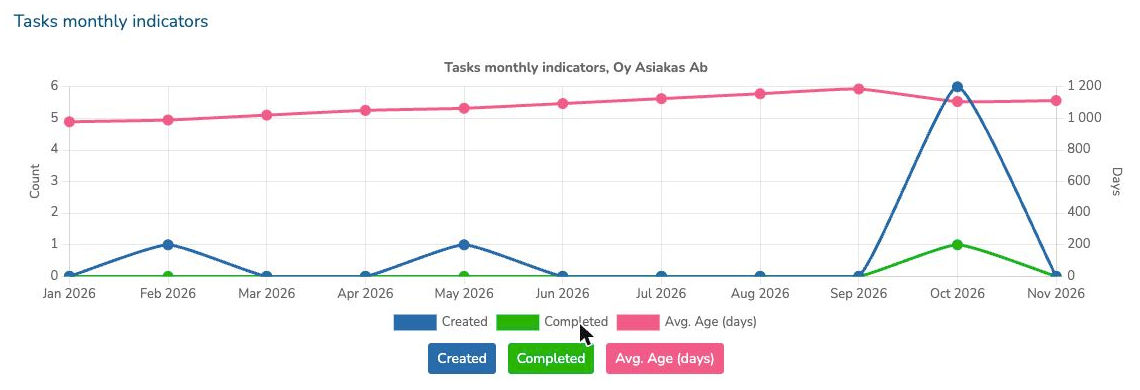
New indicators for findings and tasks
Three new widgets help you follow how actions progress:
- Findings by risk level
- Findings monthly indicators and Tasks monthly indicators: items created and completed per month, and how many days items have stayed open on average, a useful leading indicator.
The widgets are available on dashboards, in the Action Management Follow-Up Report and in the assessment summary and comparison reports. All charts now use a new, faster chart engine.
Findings and tasks also record when they were closed, and the Excel exports include the created and closed dates.
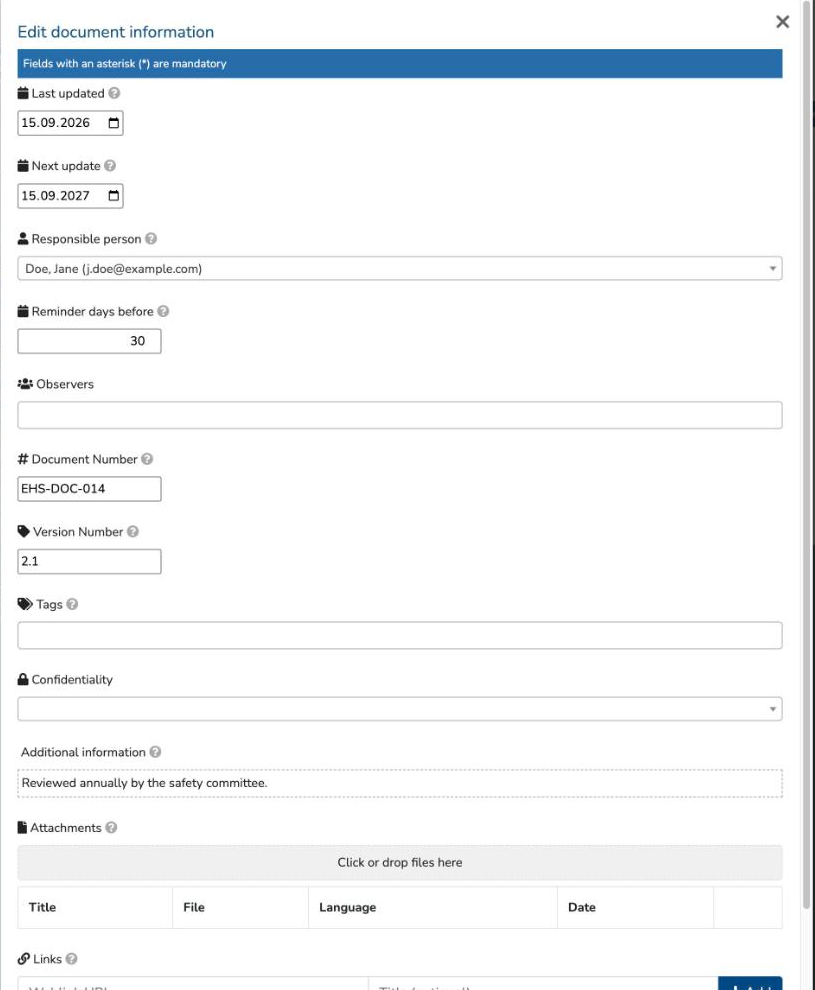
Document Register upgrade
The Document Register has new fields to manage your EHS documents properly:
- Document number, version number, tags and confidentiality
- Last updated and next update dates, with a custom update interval and a reminder before the next update
- Responsible person and observers
- Attachments with version and language, and web links to documents kept elsewhere
The register can be filtered with all of the new fields. The Document Register is available with its own subscription.
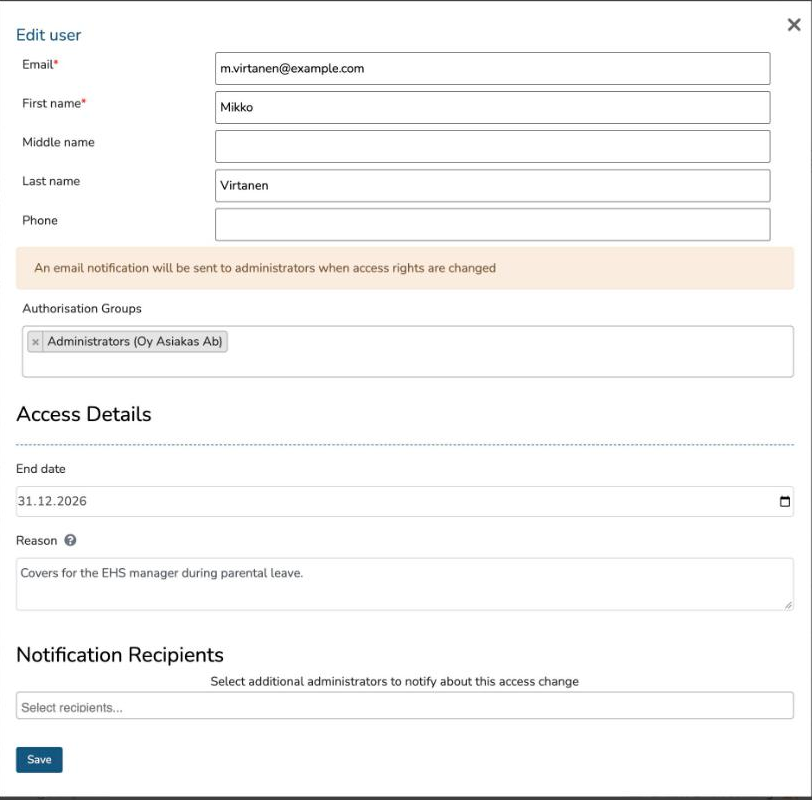
Temporary access rights and access change log
Account administrators can now grant access rights for a limited time. Set an end date and a reason; the rights are removed automatically on that date and the user is told by e-mail.
- When access rights change, you choose which other administrators are notified.
- The access change log shows who changed whose rights and when.
- The user list can be searched by name or e-mail.
- When a user is removed, their responsibilities can be handed over to another person in the same step.
Other improvements
Requirements and regulatory monitoring
- Amendments have their own titles, and minor amendments are folded away in the regulatory change report and e-mails, so the important changes stand out.
- Unanswered applicability questions no longer hide requirements: the requirements stay visible until the question is answered.
- Large requirement registers open faster.
- The version history of a requirement shows its published versions.
Assessments, findings and tasks
- New finding type Opportunity for recording improvement ideas.
- Quick findings: chosen finding types can be saved with one click while conducting an assessment.
- Assessments work better on a phone.
- The daily assessment digest reports all changes since the previous digest.
- The findings board moves a card to its new column right after a state change.
- When a state change is refused, the finding opens at the missing field with a clear message.
Registers
- Chemicals and permit conditions have a change history, and the history everywhere shows who made each change.
- QR code printouts for safety data sheets include only the chemicals in the filtered list.
- Number fields accept both decimal comma and decimal point.
- Training reminders are sent to each person individually.
E-mails and notifications
- Redesigned e-mails with clear buttons and more detail, such as the linked requirement or finding and the location.
- The action digest can be ordered daily and lists what changed.
- Listeners also receive the daily reminders.
Usability
- New typeface in line with Ramboll branding, in the application and in PDF reports.
- Clear search works the same way in every list, including filters that came from a link.
- Dates typed into date fields are saved once, cleanly.
- More photo formats can be attached.
Earlier highlights
- External access to chemical safety data sheets with QR codes (12/2025)
- Excel import of findings and an improved risk matrix editor
- Assessment reminders, and tasks and archived findings in assessment reports
- Font and display preferences per user, and SSO-only login for an account
- Requirement comparison between accounts